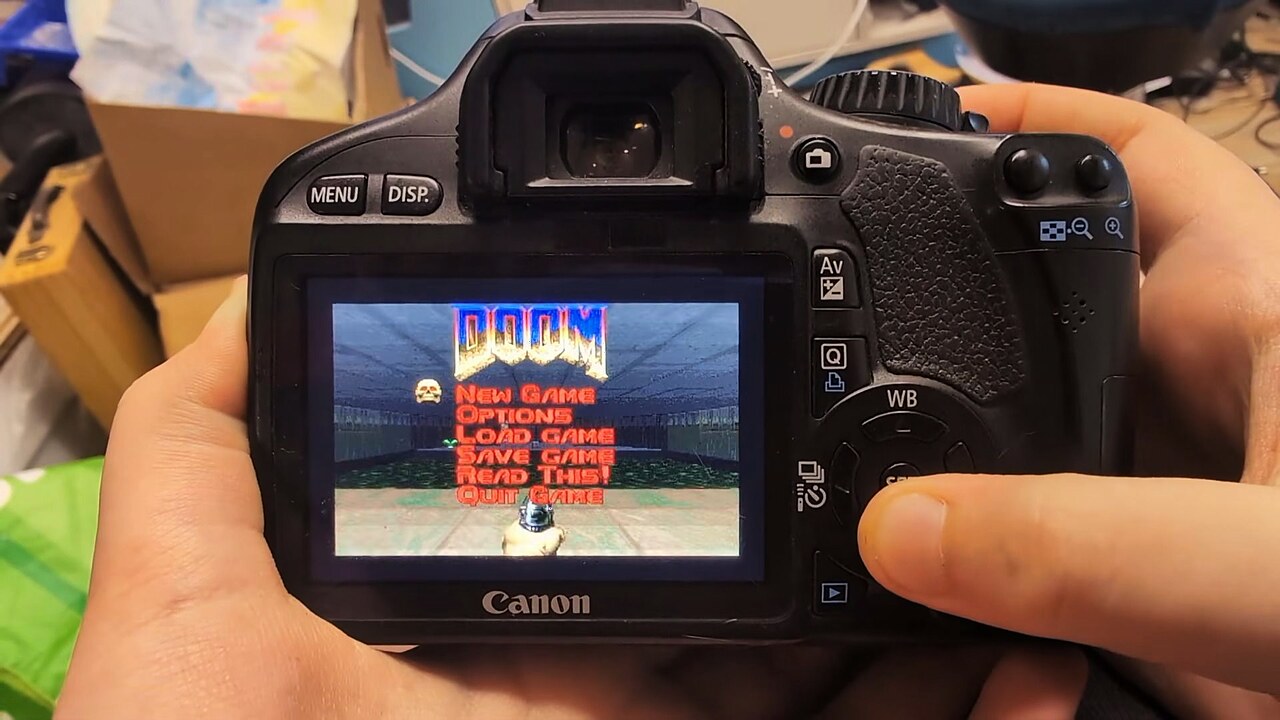
Doom runs on everything. Over the past thirty years the 1993 id Software shooter has appeared on ATMs, pregnancy tests, an orbiting satellite, and an Apple Lightning-to-HDMI dongle. The tradition continues: developer Bas Lichtjaar — known on GitHub as lauris-nl — has now got Doom running on a Canon EOS 550D DSLR camera from 2010, complete with functioning controls, audio, save states, and a secret cheat code menu.

The Camera That Now Runs Doom
The Canon EOS 550D — also sold as the Rebel T2i and EOS Kiss X4 — is an entry-level APS-C DSLR that Canon released in 2010. It was never particularly celebrated for raw performance; it hit the market at the budget end of Canon’s lineup and has spent much of the past decade gathering dust in camera bags. What it does have is a DIGIC 4 processor, a 3-inch 720×480 rear display, a built-in speaker, and just enough hardware headroom to run the greatest video game of all time.
The port runs through Magic Lantern, an open-source firmware extension for Canon cameras that has been around since 2009. Magic Lantern’s primary purpose is to add features Canon didn’t ship — dual ISO, expanded video recording options, RAW output on cameras that weren’t designed for it, Fibonacci spiral grid overlays — but Lichtjaar found that it was also a functional enough platform to run Doom. His release, Doom550D v0.4.1, is available on GitHub. Magic Lantern has always carried risk — the project is community-maintained, entirely unofficial, and Canon explicitly does not support it. Using it can void camera warranties and, if something goes wrong during installation, brick the device. Most photographers who rely on a 550D for professional work should think carefully before installing anything from the Magic Lantern ecosystem.
For those with a spare 550D lying around, however, the appeal is obvious.
How You Actually Play Doom on a DSLR
The control scheme uses whatever the Canon 550D has available. The directional pad handles movement and looking around; the SET button fires; the Menu button opens the in-game menu; the DISP button backs out of menus; the rear command dial switches weapons; and holding the zoom buttons activates running and strafing. It is not comfortable. It is, however, functional.
The game runs natively at 720×480 — the camera’s full rear screen resolution. An optional display mode scales it down to 360×240 first and then upscales each pixel to a 2×2 block, which keeps things readable on the small display. The camera’s built-in speaker handles audio at 48kHz mono, meaning the Doom soundtrack and its iconic sound effects come through the same speaker Canon intended for playback confirmation beeps.
Save files work. Multiple WAD files are supported, so players who own other Doom titles can load their own data. One catch: users must supply their own legally obtained WAD files — the repository includes only the open-source engine code, not Doom’s commercial game data. The free shareware WAD, which covers the first episode, is a usable starting point for those who want to experiment without purchasing a full copy.
One Warning Worth Taking Seriously
Lichtjaar is explicit that Doom550D v0.4.1 only works on a Canon EOS 550D running firmware version 1.0.9. The reason is technical: the port uses specific memory addresses extracted from that exact firmware build. Installing it on a different Canon model, a different firmware revision, or any other camera risks bricking the hardware permanently.
For those who don’t have a spare Canon 550D, a separate developer has built a Doom port for the Canon PowerShot SD1000 — a point-and-shoot from 2007 — so there are options. The “runs on everything” tradition shows no sign of slowing down: the question at this point is less whether Doom can run on a given device and more whether anyone has yet thought to try it.
Importantly, running Magic Lantern of any kind on a Canon camera voids the warranty and is entirely unofficial. Canon does not endorse it. The installation instructions are on GitHub for those willing to proceed — ideally with a camera that is no longer used for, say, wedding photography.