
Hide
FM27 ships with some fake names — placeholder clubs, competitions, people and awards where Sports Interactive doesn’t hold the licence. The fix is free: install a real names licence fix to restore the correct names, and a separate logo pack to add real club and competition badges. The name fix goes into the game’s database folder (or runs via an auto-installer), while the logo pack goes into your graphics folder under Documents. Close the game before you install either one.
Here is how to install the FM27 real name fix and logo pack step by step, plus the common mistakes that stop them working. Always follow the instructions bundled with whichever download you choose, as file paths differ between providers.
What the fixes do
The two downloads solve two different problems.
| Fix | What it restores | Where it goes |
|---|---|---|
| Real names licence fix | Real club, competition, people & award names | Game database folder (or auto-installer) |
| Logo pack | Real club & competition badges | Graphics folder (Documents) |
| Facepack (optional) | Real player faces | Graphics folder |
| Kit pack (optional) | Real kits (includes the name fix) | Graphics folder |
Installing the real name fix
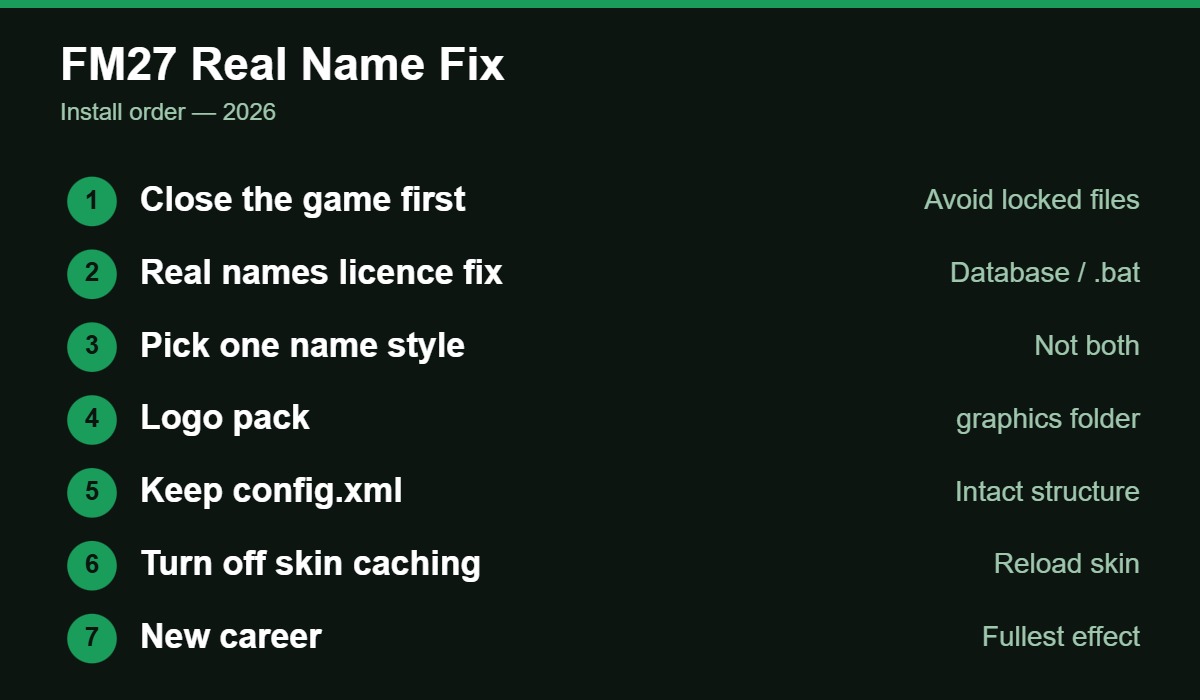
There are two common methods, depending on the provider. Some packs (FMScout’s, for example) include an auto-installer: you quit the game, extract the download, keep the .bat file and the two .lnc licence files together, and run the .bat — using “Run as administrator” if files are locked. It detects Steam, Epic and Xbox/Game Pass installs for you. The manual method (FM Blog’s free Real Name & Kit Fix) has you drop the licence file into the game’s database folder at 2700/lnc/all/, choosing one name style — the With-Sponsors or Without-Sponsors variant — rather than both. A third provider (Passion4FM) places its files in an “editor data” folder under your Documents and claims the names appear even in an existing save. Because these paths genuinely differ, the rule is simple: follow the instructions inside the download you picked, and don’t mix two name fixes at once.
Installing the logo pack
The logo pack is a graphics download and installs the same way as faces and kits. The main FM Blog pack carries 83,245 club and competition logos. To install: save your career and quit the game, extract the zip, and copy the graphics/FM Blog Logos folder into your FM27 graphics folder — keeping every subfolder and the config.xml together. On Windows the default graphics location is Documents/Sports Interactive/Football Manager 27/graphics (create the graphics folder if it isn’t there yet). Load the game, go to Preferences, turn off “Use caching to reduce page loading times” and reload your skin so the game picks up the new images. The same process adds facepacks and kit packs — they simply go in the same graphics folder.
More Football Manager 27 on EverythingEdinburgh: how to play FM27 free, the best FM27 wonderkids and the best FM27 tactics.
Tips & common mistakes
A few things trip people up. First, close the game before installing — files can be locked while FM27 is running, which is why the auto-installer suggests “Run as administrator”. Second, for the fullest effect of the name fix, start a new career: some licence changes (especially national-team and kit licensing) only apply cleanly on a fresh save, even if a provider says it works on existing saves. Third, don’t install two different name fixes at once — pick one style and stick with it. Fourth, if logos don’t show up, it’s almost always because the config.xml was left behind, the folder structure was changed, or skin caching is still on. Re-copy the pack intact and reload the skin.
.bat (run as admin) or by dropping the licence file into the game’s database folder — then add the logo pack to Documents/Sports Interactive/Football Manager 27/graphics, keeping the config.xml and folder structure intact. Close the game before installing, start a new career for the fullest licence effect, and never run two name fixes at once. Follow the instructions bundled with your chosen download.FM27 real name fix FAQ
Documents/Sports Interactive/Football Manager 27/graphics on Windows. Copy the pack’s folder in with its config.xml and subfolders intact, then reload your skin with caching turned off.Steps are as of 30 October 2026, drawn from community guides (FMScout, FM Blog, Passion4FM). Install paths and file names differ between providers — always follow the instructions bundled with the download you choose, and only download from reputable FM community sites.